ODEX HSE End-User Training Documentation

This manual is designed for users with zero Odoo background. It explains Odoo 18 behavior, module dependencies, role permissions, and full operating workflows for `odex_hse` in English and Arabic.

Display mode | وضع العرض

1) Guide scope and training outcome | نطاق الدليل ومخرجات التدريب

Start here before any live operation.

English

  • Audience: first-time users, HSE officers, supervisors, coordinators, and functional admins.
  • Goal: execute HSE workflows correctly from configuration to closure with audit-ready evidence.
  • Method: learn in sequence (foundation, setup, execution, reporting, governance).
  • Rule: every process must be practiced end-to-end in a training database before production.
Expected outcome: each user can run their role without breaking approvals, compliance, or data quality.

العربية

  • الجمهور المستهدف: مستخدم جديد بالكامل، مسؤول HSE، مشرف، منسق، ومدير وظيفي للنظام.
  • الهدف: تنفيذ سير عمل HSE بشكل صحيح من الإعداد وحتى الإغلاق مع أدلة جاهزة للتدقيق.
  • المنهج: التعلم بالتسلسل (الأساسيات، التهيئة، التنفيذ، التقارير، الحوكمة).
  • القاعدة: كل عملية يجب تطبيقها كاملة على قاعدة تدريب قبل الإنتاج.
المحصلة المتوقعة: كل مستخدم ينفذ دوره دون كسر الاعتمادات أو الامتثال أو جودة البيانات.

2) Odoo 18 essentials for beginners | أساسيات Odoo 18 للمبتدئين

English quick baseline

  1. Confirm active company before creating records.
  2. Understand views: list, form, kanban, calendar, pivot, graph.
  3. Use search filters, group by, and favorites to control workload.
  4. Use chatter for evidence: messages, activities, followers, approvals.
  5. Use smart buttons to validate linked records before closure.
Most operational errors come from wrong company context and incomplete mandatory data.

خط أساس سريع

  1. تأكد من الشركة النشطة قبل إنشاء أي سجل.
  2. افهم طرق العرض: قائمة، نموذج، كانبان، تقويم، Pivot، Graph.
  3. استخدم الفلاتر والتجميع والمفضلة لتنظيم العمل.
  4. اعتمد على الـ Chatter كدليل تشغيلي: الرسائل والأنشطة والمتابعون والاعتمادات.
  5. استخدم الأزرار الذكية للتحقق من السجلات المرتبطة قبل الإغلاق.
أغلب أخطاء التشغيل تأتي من شركة خاطئة أو بيانات إلزامية غير مكتملة.

3) Governance and role boundaries | الحوكمة وحدود الأدوار

System Admin / مدير النظام
Users, groups, companies, global settings, access governance.
HSE Manager / مدير HSE
Policy defaults, approval matrix, closure authority, KPI review.
HSE Officer / مسؤول HSE
Daily permits, incidents, inspections, task follow-up.
Training Coordinator / منسق التدريب
Matrix rules, sessions, imports, notification governance.
Contractor Coordinator / منسق المقاولين
Onboarding, portal credentials, document checks.
Department Supervisor / مشرف القسم
Operational review, approvals, field validation.

Control principles

  • Requester and final approver should be separated when policy requires.
  • Governance actions are role-restricted and must leave traceable chatter evidence.
  • Bulk import and governance reports are not general-user actions.

مبادئ الضبط

  • يجب فصل دور الطالب عن المعتمد النهائي عندما تتطلب السياسة ذلك.
  • إجراءات الحوكمة مقيّدة بالأدوار ويجب أن تترك أثرًا موثقًا في الـ Chatter.
  • الاستيراد الجماعي وتقارير الحوكمة ليست إجراءات مستخدم عام.

4) Dependency modules map from manifest | خريطة الموديولات المعتمدة من المانيفست

Map each dependency to practical HSE usage.

Module Operational Role What user configures first
`base`, `web`Core records, companies, users, interface behavior.Companies, users, languages, groups.
`mail`, `calendar`Activities, reminders, approvals, coordination.Activity types, reminder habits, inbox discipline.
`contacts`, `portal`Contractors/vendors and external access workflows.Partner data quality, portal invitation policy.
`hr`, `hr_skills`Employee identity, jobs, competency ties.Employees, jobs, departments, skill structure.
`hr_skills_slides`, `website_slides`eLearning and guided learning paths.Courses, channels, learner assignments.
`maintenance`Equipment relation for permits and certificate compliance.Assets, equipment metadata, ownership.
`project`Site/project operating context.Projects aligned with HSE sites.
`stock`PPE and material readiness visibility.Products, categories, stock handling.
`fleet`Journey and vehicle-related safety workflows.Vehicles, responsible drivers, documents.
`document_management_system`Controlled HSE document lifecycle.Folder rules, metadata governance, retention.
`report_xlsx`, `report_xlsx_helper`Management packs and export reporting.Export templates and reviewer cadence.
`odex_shadow_ai`, `odex_smart_guidance`Guidance and assisted operational recommendations.Enable rules, verify guidance relevance.
`odex_whatsapp`Notification channel for urgent operational communication.Channel policy, recipients, escalation limits.

5) Initial setup sequence before go-live | تسلسل التهيئة قبل الإطلاق

Go-live checklist (English)

  1. Configure company profile, logo, addresses, legal identity.
  2. Create users and assign role-based security groups.
  3. Set site/project mapping and operational boundaries.
  4. Load permit/risk/hazard/PPE templates and policy defaults.
  5. Set approval matrix and closure governance owners.
  6. Enable notifications and escalation thresholds.
  7. Validate reports and print layouts in preview and final mode.

قائمة جاهزية الإطلاق

  1. تهيئة ملف الشركة والشعار والعناوين والهوية القانونية.
  2. إنشاء المستخدمين وربطهم بمجموعات الأدوار المناسبة.
  3. ربط المواقع بالمشاريع وتحديد حدود التشغيل.
  4. تحميل قوالب التصاريح/المخاطر/المخاطر المحتملة/PPE والسياسات الافتراضية.
  5. ضبط مصفوفة الاعتماد ومالكي صلاحية الإغلاق.
  6. تفعيل التنبيهات وحدود التصعيد الزمنية.
  7. اختبار التقارير والتخطيطات في وضع المعاينة والطباعة النهائية.

6) Master data blueprint | مخطط البيانات الرئيسية

What must be clean before transactions

  • Sites, site locations, and operating zones.
  • Employees linked to correct job and department.
  • Contractors/vendors with complete compliance profiles.
  • Permit types, checklist templates, conflict rules, risk levels.
  • Training courses, requirements, validity periods.
  • Equipment and certificate requirements.
Data discipline rule: if master data is weak, workflow quality collapses even with good approvals.

ما يجب تنظيفه قبل المعاملات

  • المواقع، المواقع الفرعية، ومناطق التشغيل.
  • الموظفون مع ربط صحيح بالوظيفة والقسم.
  • المقاولون/الموردون مع ملفات امتثال مكتملة.
  • أنواع التصاريح، قوالب الفحص، قواعد التعارض، مستويات المخاطر.
  • الدورات التدريبية، المتطلبات، فترات الصلاحية.
  • المعدات ومتطلبات الشهادات المرتبطة بها.
قاعدة جودة البيانات: إذا كانت البيانات الرئيسية ضعيفة، ينهار سير العمل حتى مع وجود اعتماد جيد.

7) Site Entry + EAP + POB workflow | سير دخول الموقع + EAP + POB

Execution steps

  1. Create Site Entry Request (SER) with person, site, employer, and date.
  2. Validate prerequisites: induction, training, medical and required docs.
  3. If external assignment is needed, prepare EAP and accommodation details.
  4. Submit for review and approval, then perform controlled check-in.
  5. Confirm POB live record is created and synchronized.
  6. On check-out, validate final status and exception handling controls.
Do not clear active entry exceptions while person is still checked in on live POB.

خطوات التنفيذ

  1. أنشئ طلب دخول موقع (SER) مع بيانات الشخص والموقع وجهة العمل والتاريخ.
  2. تحقق من المتطلبات: الاستقراء، التدريب، اللياقة الطبية، والوثائق المطلوبة.
  3. إذا لزم تكليف خارجي، جهّز EAP وبيانات السكن.
  4. أرسل للمراجعة والاعتماد ثم نفّذ تسجيل الدخول بشكل منضبط.
  5. تأكد من إنشاء سجل POB مباشر وتزامن الحالة.
  6. عند تسجيل الخروج، تحقق من الإغلاق وضوابط إدارة الاستثناءات.
يُمنع مسح استثناء دخول فعّال طالما الشخص ما زال مسجلاً على لوحة POB المباشرة.

8) PTW lifecycle (Permit To Work) | دورة تصريح العمل (PTW)

From request to closure

  1. Select permit type and verify default policy/checklist is loaded.
  2. Capture scope, location, hazards, controls, and responsible parties.
  3. Apply approval matrix and required signatures.
  4. Use suspension or handover when operation context changes.
  5. Use revalidation when permit is extended or controls must be reassessed.
  6. Close only after final condition checks and evidence attachment.
Operational closure without field evidence and required sign-offs is non-compliant.

من الطلب حتى الإغلاق

  1. اختر نوع التصريح وتأكد من تحميل سياسة وقائمة الفحص الافتراضية.
  2. سجل نطاق العمل والموقع والمخاطر والضوابط والمسؤولين.
  3. طبّق مصفوفة الاعتماد والتوقيعات المطلوبة.
  4. استخدم التعليق أو التسليم عند تغير ظروف التشغيل.
  5. استخدم إعادة الاعتماد عند التمديد أو إعادة تقييم الضوابط.
  6. لا تُغلق إلا بعد الفحوصات النهائية وإرفاق الأدلة.
الإغلاق التشغيلي بدون أدلة ميدانية وتوقيعات إلزامية يُعد عدم امتثال.

9) LOTO and isolation controls | ضوابط العزل وLOTO

Control points

  • Define isolation points, lock ownership, and verification sequence.
  • Link isolation records with permits and equipment context.
  • Use sign-off workflow to prove lock placement and release integrity.
  • Keep printable isolation logs aligned with system records.

نقاط التحكم

  • حدد نقاط العزل وملكية الأقفال وتسلسل التحقق.
  • اربط سجلات العزل بالتصاريح وسياق المعدات.
  • استخدم مسار التوقيع لإثبات وضع الأقفال وسلامة فك العزل.
  • حافظ على تطابق سجلات العزل المطبوعة مع بيانات النظام.

10) Incident, investigation, and CAPA | الحوادث والتحقيق وCAPA

Operational flow

  1. Log incident with accurate category/type and initial facts.
  2. Assign investigator and timeline activities.
  3. Perform root cause analysis (e.g., fishbone/five whys).
  4. Create CAPA actions with owner and deadline.
  5. Validate effectiveness, then close with evidence package.

المسار التشغيلي

  1. سجل الحادث بنوع وفئة صحيحة مع الحقائق الأولية.
  2. عيّن محققًا وأنشطة زمنية للتحقيق.
  3. نفّذ تحليل السبب الجذري (مثل عظم السمكة/لماذا خمس مرات).
  4. أنشئ إجراءات CAPA بمسؤول وتاريخ استحقاق.
  5. تحقق من الفاعلية ثم أغلق بحزمة أدلة كاملة.

11) Audits, findings, and nonconformance | التدقيق والملاحظات وعدم المطابقة

Hands-on walkthrough from planning an audit to closing NCR with evidence | دليل عملي من تخطيط التدقيق حتى إغلاق NCR بالأدلة

Screen-by-screen training flow (exact buttons)

  1. Open menu path: QHSE -> Quality & Compliance -> Audits and Schedules, then click New.
  2. In the audit form, fill minimum fields before any workflow action: Audit Type, Audit Date, Audit Title, HSE Site, and assign Lead Auditor.
  3. If checklist-based auditing is required, set checklist_id then click Create Checklist Run -> Open Checklist Run -> Generate Checklist Lines.
  4. Click Plan to move from draft into planned execution, then click Start when field audit begins.
  5. During execution, click Generate Findings to create finding records from checklist results, then complete each finding form with severity, evidence, owner, and target closure date.
  6. When field verification ends, click Complete, then Issue Report (Safety Officer), and finally Close (Manager) after unresolved findings are governed.
RecordStatus path for trainingCritical buttons to teach
hse.audit draft -> planned -> in_progress -> completed -> report_issued -> closed Plan, Start, Complete, Issue Report, Close
hse.audit.finding open -> action_planned/in_progress -> verification -> closed Create NCR, Create CAPA, Request Verification, Verify & Close
hse.nonconformance draft -> triage -> investigation -> action -> verification -> closed Submit, Start Investigation, Escalate to CAPA, Request Verification, Close
Note: NCR created from Create NCR in Audit Findings is auto-created directly in triage state (not draft).

What to do in Audit Findings screen

  1. Open menu: QHSE -> Quality & Compliance -> Audit Findings.
  2. For each finding, complete: title, severity, finding_type, responsible_id, target_closure_date, description, and evidence.
  3. If finding is major/critical, use Create NCR or Create CAPA according to governance.
  4. Before final closure, use Request Verification; Manager uses Verify & Close.
Never close audits by forcing state progression. Each closure must include evidence, CAPA/NCR linkage (when required), and role-correct approval.
Reference screen style for structured form data entry in ODEX HSE
Form discipline example: train users to complete structured mandatory fields before workflow transitions.
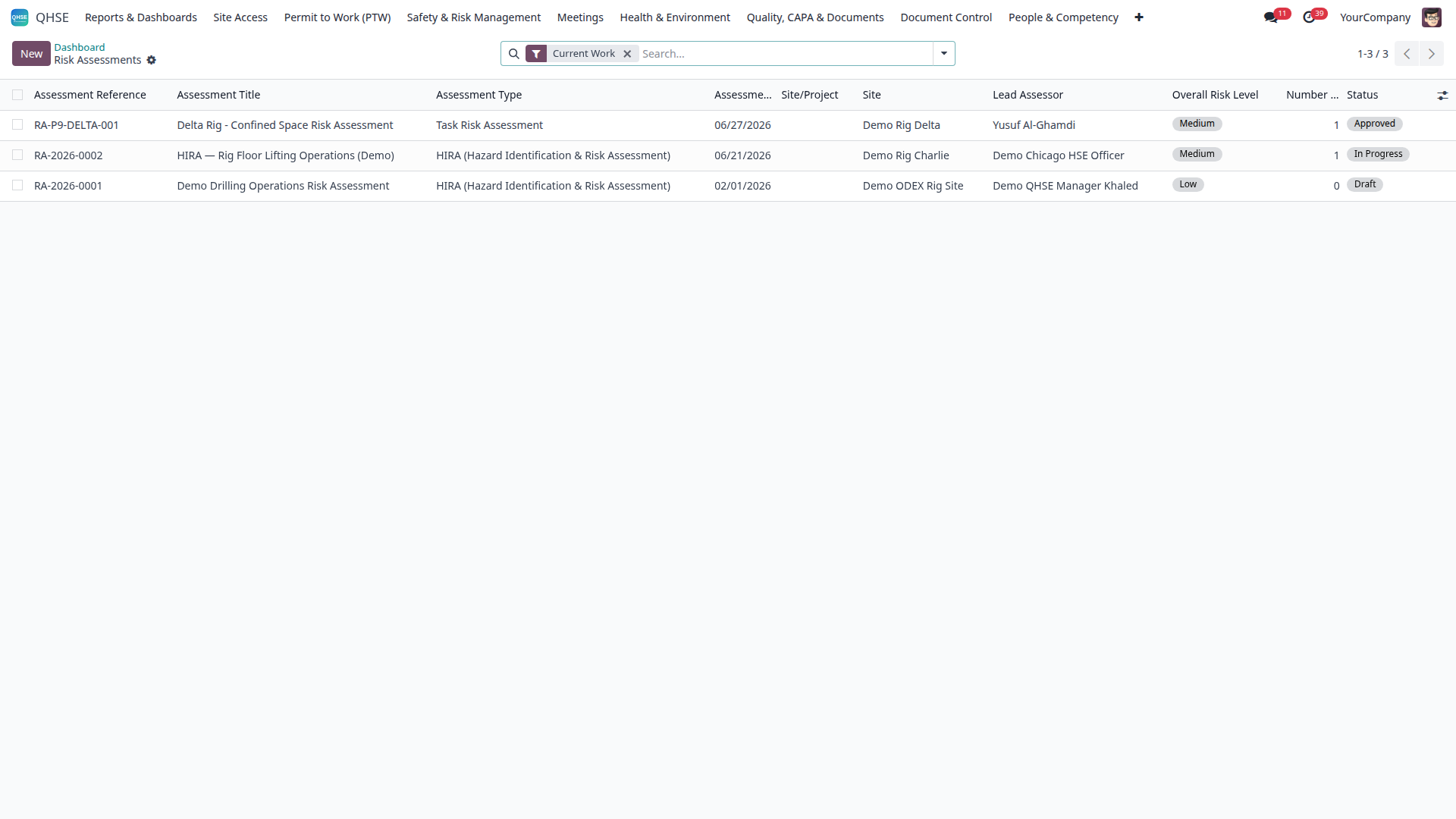
Risk assessment style used for evidence-driven review in ODEX HSE
Evidence mindset: findings and NCR decisions must be supported with objective risk/evidence context.

مسار تدريبي عملي شاشة بشاشة (بالأزرار الفعلية)

  1. ادخل من المسار: QHSE -> Quality & Compliance -> Audits and Schedules ثم اضغط New.
  2. في نموذج التدقيق عبّئ الحد الأدنى قبل أي انتقال: Audit Type، Audit Date، Audit Title، HSE Site، وتعيين Lead Auditor.
  3. عند الاعتماد على القوائم المرجعية: حدّد checklist_id ثم استخدم Create Checklist Run ثم Open Checklist Run ثم Generate Checklist Lines.
  4. اضغط Plan لنقل السجل من المسودة إلى التخطيط، ثم Start عند بدء التدقيق الميداني.
  5. أثناء التنفيذ استخدم Generate Findings لإنشاء الملاحظات، ثم أكمل كل ملاحظة (الحدة، الأدلة، المسؤول، تاريخ الإغلاق المستهدف).
  6. بعد انتهاء التحقق الميداني اضغط Complete ثم Issue Report (ضابط السلامة) ثم Close (المدير) بعد ضبط الملاحظات المفتوحة.
السجلمسار الحالات للتدريبالأزرار الحرجة التي يجب تدريبها
hse.audit draft -> planned -> in_progress -> completed -> report_issued -> closed Plan، Start، Complete، Issue Report، Close
hse.audit.finding open -> action_planned/in_progress -> verification -> closed Create NCR، Create CAPA، Request Verification، Verify & Close
hse.nonconformance draft -> triage -> investigation -> action -> verification -> closed Submit، Start Investigation، Escalate to CAPA، Request Verification، Close
ملاحظة: عند إنشاء NCR من زر Create NCR داخل Audit Findings يتم إنشاؤه مباشرة بحالة triage (وليس draft).

ماذا نعمل في شاشة Audit Findings

  1. ادخل من: QHSE -> Quality & Compliance -> Audit Findings.
  2. لكل ملاحظة أكمل: title، severity، finding_type، responsible_id، target_closure_date، description، evidence.
  3. إذا كانت الملاحظة Major/Critical استخدم Create NCR أو Create CAPA حسب الحوكمة.
  4. قبل الإغلاق النهائي استخدم Request Verification، والمدير ينفذ Verify & Close.
ممنوع إغلاق التدقيق بالقفز بين الحالات. كل إغلاق يجب أن يحتوي أدلة وربط CAPA/NCR (عند اللزوم) واعتمادًا صحيحًا حسب الدور.
مثال على إدخال منظم للحقول الإلزامية في نماذج ODEX HSE
انضباط النموذج: تدريب المستخدم على تعبئة الحقول الإلزامية قبل الانتقال بين الحالات.
نمط تقييم المخاطر الداعم لقرارات الأدلة في ODEX HSE
عقلية الأدلة: قرار الملاحظة وNCR يجب أن يستند إلى سياق موضوعي من المخاطر والأدلة.

12) Training matrix and competency governance | مصفوفة التدريب وحوكمة الكفاءة

Core practice

  • Define job-based training requirements with priority and validity rules.
  • Create sessions and assign employees by role and site.
  • Import certificates in bulk only by authorized roles.
  • Review gap matrix and run due/overdue notifications.
  • Use governance reports for escalation and compliance closure.

الممارسة الأساسية

  • حدد متطلبات التدريب لكل وظيفة مع الأولوية وقواعد الصلاحية.
  • أنشئ جلسات تدريب ووزّع الموظفين حسب الدور والموقع.
  • استيراد الشهادات جماعيًا يكون فقط للأدوار المخولة.
  • راجع مصفوفة الفجوات وشغّل تنبيهات الاستحقاق والتأخير.
  • استخدم تقارير الحوكمة للتصعيد وإغلاق فجوات الامتثال.

13) Contractor and vendor onboarding | تأهيل المقاولين والموردين

Controlled onboarding

  1. Create partner profile and classify contractor/vendor type.
  2. Collect mandatory compliance documents and key contacts.
  3. Use onboarding import wizard for large validated batches.
  4. Resolve blockers, then approve/reject with reason traceability.
  5. Issue portal credentials after compliance pass.

تأهيل منضبط

  1. أنشئ ملف الشريك وحدد تصنيف المقاول/المورد.
  2. اجمع وثائق الامتثال الإلزامية وجهات الاتصال الأساسية.
  3. استخدم معالج الاستيراد للتأهيل الجماعي بعد التحقق.
  4. عالج الموانع ثم اعتمد/ارفض مع سبب موثق.
  5. أصدر صلاحيات البوابة بعد نجاح متطلبات الامتثال.

14) Certificates and equipment compliance | الشهادات وامتثال المعدات

Key controls

  • Define certificate templates and issue/renewal logic.
  • Link requirements to maintenance equipment records.
  • Track expiry windows and run proactive reminders.
  • Use batch export for audit packs and verification cycles.
  • Block operations if certificate policy fails.

ضوابط رئيسية

  • حدد قوالب الشهادات ومنطق الإصدار والتجديد.
  • اربط المتطلبات بسجلات المعدات في الصيانة.
  • تابع نوافذ انتهاء الصلاحية وشغّل تنبيهات استباقية.
  • استخدم التصدير الدفعي لحزم التدقيق ودورات التحقق.
  • امنع التشغيل عند فشل متطلبات سياسة الشهادات.

15) Environmental, journey, and field operations | البيئة والرحلات والتشغيل الميداني

Coverage in daily HSE operations

  • Environmental incidents, emissions, waste, water, energy, and monitoring logs.
  • Journey management and transport safety controls.
  • Drilling gate and operation-focused workflow checkpoints.
  • Ensure each environmental record has owner, evidence, and closure rationale.

التغطية في التشغيل اليومي

  • الحوادث البيئية والانبعاثات والنفايات والمياه والطاقة وسجلات المراقبة.
  • إدارة الرحلات وضوابط سلامة النقل.
  • نقاط تحقق تشغيلية خاصة بالعمليات الميدانية والبوابات التشغيلية.
  • التأكد أن كل سجل بيئي يحتوي مسؤولًا وأدلة ومبرر إغلاق.

16) Reporting rhythm and management packs | إيقاع التقارير والحزم الإدارية

Reporting discipline

  • Operational reports: permits, incidents, audits, training, compliance.
  • KPI dashboard checks must be reconciled with source records.
  • Monthly management packs should include trends, gaps, CAPA status.
  • Use XLSX exports for management review traceability.

انضباط التقارير

  • التقارير التشغيلية: التصاريح، الحوادث، التدقيق، التدريب، الامتثال.
  • مؤشرات اللوحات يجب مطابقتها مع السجلات المصدرية.
  • الحزمة الشهرية تشمل الاتجاهات والفجوات وحالة CAPA.
  • استخدم تصدير XLSX لضمان أثر مراجعة إداري واضح.

17) Recommended 30-day onboarding curriculum | منهج تدريبي مقترح لمدة 30 يوم

Week Focus Expected practical output
Week 1Odoo basics + roles + setup foundationsUsers run navigation, activities, and role-safe data entry.
Week 2Site entry + PTW + isolationTeam executes one full permit scenario from request to closure.
Week 3Incidents + investigations + CAPA + auditsTeam closes one incident cycle with validated corrective evidence.
Week 4Training matrix + onboarding + reportingTeam publishes monthly pack and role-based governance review.

Certification gate

Each trainee must complete one end-to-end live scenario in their own role with supervisor sign-off.

بوابة الاعتماد

كل متدرب يجب أن ينفذ سيناريو كاملًا من البداية للنهاية ضمن دوره الفعلي مع توقيع اعتماد من المشرف.

18) Troubleshooting and prevention reference | مرجع استكشاف الأخطاء ومنعها

IssueWrong company context
FixSwitch active company before transaction.
IssueApproval stuck
FixCheck role permissions, pending activities, missing mandatory fields.
IssueInconsistent dashboards
FixReconcile KPI values with source records and date filters.
IssueImport errors
FixUse template columns and run validation before final import.
IssuePremature closure
FixEnforce evidence attachment and sign-off checklist.
IssuePortal access confusion
FixReview partner status, credentials issuance, and portal group access.